Text effects
A text effect splits a text element into pieces and animates each piece in turn — perfect for revealing headings and labels. Add one to a selected text element, then dial in the popup below. As with every animation, the popup shows a live preview as you tweak each value.
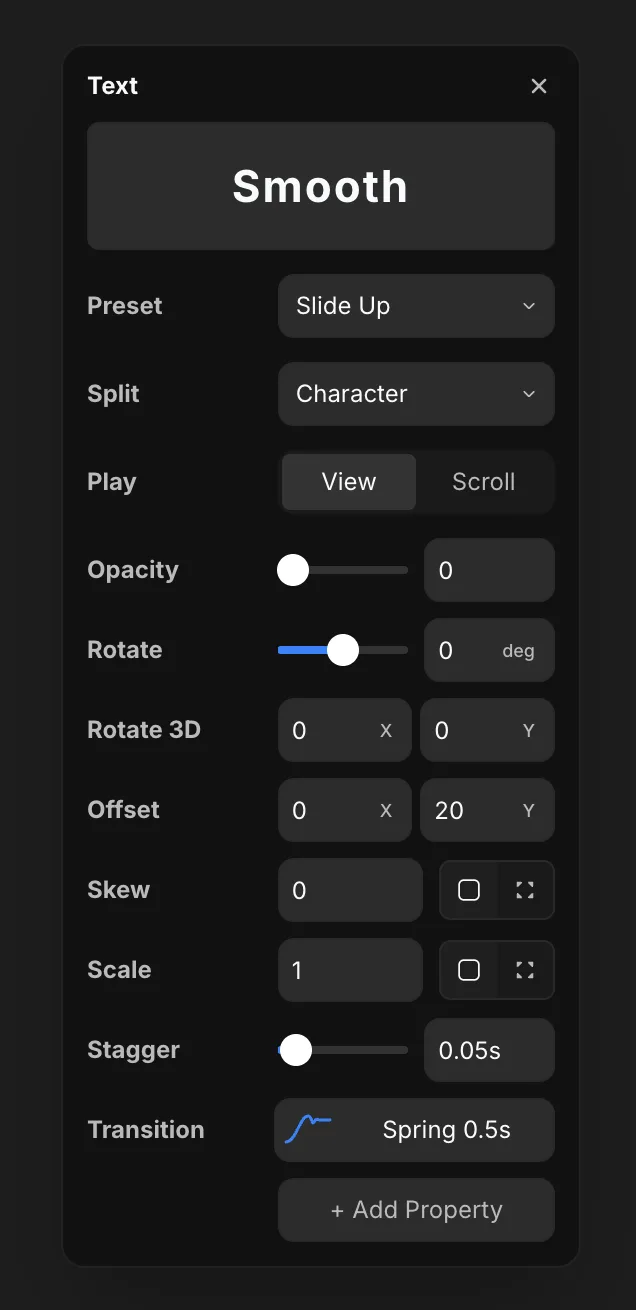
Settings
- Preset — a ready-made effect (like Slide Up) that fills in the values below. Pick one to start, then fine-tune any row.
- Split — how the text breaks into animated pieces: Character, Word, or Line. Smaller pieces give a more granular reveal.
- Play — when it runs: View (when the text scrolls into view) or Scroll (tied to scroll position).
Per-piece target styles
Each piece animates from these values to its resting state. Together they define what one character/word/line looks like before it lands:
- Opacity — fade each piece in.
- Rotate — spin each piece, in degrees.
- Rotate 3D — tilt each piece on the X and Y axes for depth.
- Offset — move each piece on X and Y (e.g. Offset Y
20for a slide-up). - Skew — slant each piece.
- Scale — grow or shrink each piece.
Use + Add Property to animate any other property per piece.
Timing
- Stagger — the delay between each piece. A small stagger (like
0.05s) makes the pieces cascade one after another instead of all at once. - Transition — how a single piece moves: duration, easing, or a spring.