Publish your website
Publishing takes your site live, served fast from a global edge network.
Publish
Press Publish in the top right of the editor, then Go live.
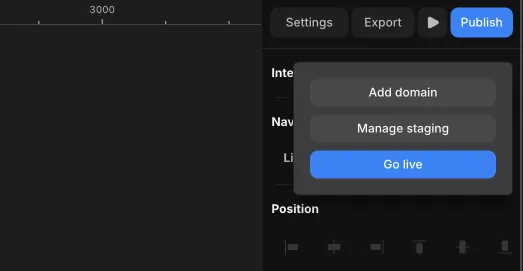
The same menu also lets you Add domain (connect a custom domain) and Manage staging (deploy a test version first).
- Revyme snapshots your project.
- It deploys that snapshot.
- You get a live URL.
Update
Re-publish any time to push your latest changes. Each publish replaces the live deployment - and is backed up automatically, so you can roll back.
Next steps
- Use your own address - see Custom domains.
- Test before you go live with Staging.