
Insert menu
The Insert Menu is your gateway to adding content to your website.
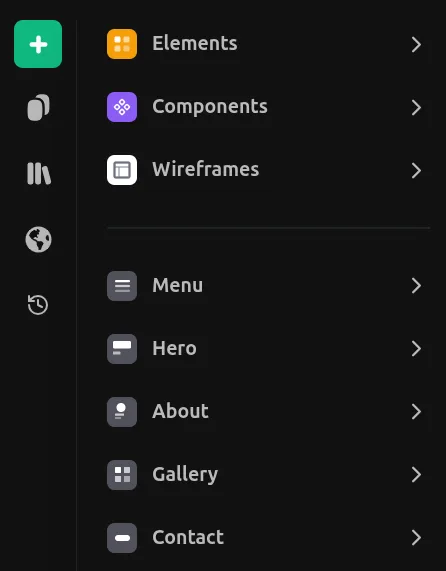
Opening the Insert Menu
Click the green + button in the left panel to open the Insert Menu.
Categories
Main Categories
Elements
Basic building blocks like frames, text, images, buttons, and form inputs. Everything you need to construct your pages.
Components
Pre-made components ready to use. Drag and drop buttons, cards, forms, and other common UI patterns.
Wireframes
Low-fidelity layout templates to quickly sketch out page structures before adding detailed content.
Page Sections
Menu
Navigation bars, headers, and menu layouts. Includes responsive hamburger menus for mobile.
Hero
Eye-catching hero sections for landing pages. Large headlines, images, and call-to-action buttons.
About
About sections to introduce yourself, your team, or your company story.
Gallery
Image galleries, portfolios, and media grids to showcase your work or products.
Contact
Contact forms, email links, and location maps. Make it easy for visitors to reach you.
Services
Service cards, feature lists, and offerings sections to highlight what you provide.
Testimonials
Customer reviews, quotes, and social proof sections to build trust.
Pricing
Pricing tables, plan comparisons, and subscription options.
Team
Team member cards, staff directories, and contributor sections.
Footer
Footer layouts with links, social icons, and copyright information.
Extras
Sparks
Dynamic and animated elements to add life to your pages. Counters, tickers, and interactive effects.
Integrations
Third-party widgets and embeds. Social feeds, maps, calendars, and external services.
Icons
Extensive icon library with thousands of icons. Search and add icons directly to your design.
Utility
Utility components like spacers, dividers, and anchors for fine-tuning your layouts.
Adding Elements
- Drag and drop any item onto the canvas
- Click to add at the center of the viewport
- Double-click to add and immediately edit