
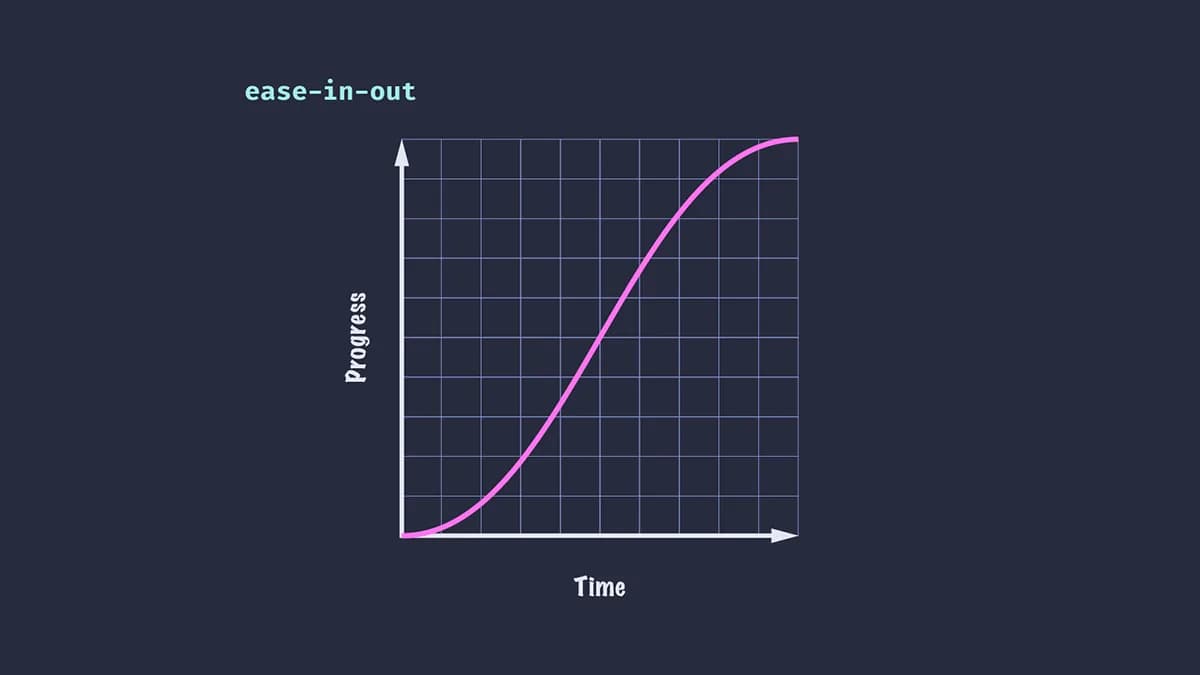
Animation Easings Explained: Complete Visual Guide
Easing functions control how animation speed changes over time. Linear movement feels robotic. Natural easings create fluid, realistic motion.
This guide covers every easing type with live examples you can test.
What is Easing?
Easing defines the rate of change during animation. Instead of moving at constant speed (linear), elements can accelerate, decelerate, or bounce.
Three easing patterns:
- Ease-in: Starts slow, ends fast
- Ease-out: Starts fast, ends slow
- Ease-in-out: Slow start and end, fast middle
Standard Easings
These are your everyday easings built into CSS and animation libraries.
Standard Easing Functions
The four core easings you'll use 90% of the time
linear
Constant speed
ease-in
Slow start, fast end
ease-out
Fast start, slow end
ease-in-out
Slow start and end
When to use:
- linear: Loading spinners, progress bars, continuous rotation
- ease-in: Elements exiting the screen
- ease-out: Elements entering the screen (most common)
- ease-in-out: Elements changing position or size on screen
Best practice: Default to ease-out for UI animations. It feels responsive because the movement starts quickly.
Power Easings
Power easings offer more control over acceleration curves. Higher power = more aggressive acceleration.
Power Easings: Quad, Cubic, Quart
Compare easing intensity across In, Out, and In-Out
Quad easeIn
Slow start
Cubic easeIn
Slow start
Quart easeIn
Slow start
Quad easeOut
Slow end
Cubic easeOut
Slow end
Quart easeOut
Slow end
Quad easeInOut
Slow both
Cubic easeInOut
Slow both
Quart easeInOut
Slow both
Quad, Cubic, Quart:
- Quad: Subtle acceleration (t²)
- Cubic: Medium acceleration (t³)
- Quart: Strong acceleration (t⁴)
When to use:
- Quad: Gentle emphasis, subtle UI changes
- Cubic: Standard intensity for most animations
- Quart: Heavy, impactful movements (modals, large transitions)
Best practice: Use Cubic for most animated UIs. Quart for dramatic entrances. Avoid Quint/Expo—too aggressive for web.
Back Easings
Back easings overshoot their target, then settle. Creates anticipation and playfulness.
Back Easings
Overshooting animations with personality
Back In
Pulls back before moving forward
Back Out
Overshoots then settles
Back In-Out
Both directions overshoot
When to use:
- Modal entrances
- Button interactions
- Playful, expressive interfaces
- Gaming UIs
When NOT to use:
- Professional dashboards
- Financial applications
- Anywhere precision matters
- If your brand is serious/corporate
Elastic Easings
Elastic easings oscillate like a spring attached to a rubber band. Multiple overshoots before settling.
Elastic Easings
Oscillating motion with rubber band physics
Elastic In
Oscillates at start
Elastic Out
Oscillates at end
Elastic In-Out
Oscillates both
When to use:
- Fun, casual apps
- Games and entertainment
- Playful error states
- Notifications that demand attention
When NOT to use:
- Professional interfaces
- Anywhere subtlety matters
- Small UI elements (too distracting)
- Enterprise software
Warning: Elastic easings are strong personality. Use sparingly.
Bounce Easings
Bounce easings simulate an object bouncing off a surface. Multiple impacts before settling.
Bounce Easings
Physics-based bouncing motion
Bounce In
Bounces at start
Bounce Out
Bounces at end
Bounce In-Out
Bounces both ends
When to use:
- Objects "dropping" into position
- Playful confirmation feedback
- Gamification elements
- Children's apps
When NOT to use:
- Subtle interactions
- Professional interfaces
- High-frequency animations
- Anywhere bounce doesn't make physical sense
Spring Physics
Springs aren't traditional easings—they're physics simulations. Instead of duration and curve, you control stiffness and damping.
Spring Configurations
Different spring personalities for different use cases
Gentle Spring
Soft, slow bounce
Default Spring
Balanced spring
Snappy Spring
Quick, tight bounce
Stiff Spring
Firm, minimal bounce
Wobbly Spring
Loose, playful bounce
Spring parameters:
- Stiffness: How tight the spring is (higher = faster, stiffer)
- Damping: How much resistance (higher = less bounce)
When to use each:
- Gentle: Large, heavy elements (modals, panels)
- Default: General purpose spring
- Snappy: Small UI elements, quick interactions
- Stiff: Minimal bounce, professional feel
- Wobbly: Playful, loose, expressive
Why springs? They feel more natural than duration-based easings because they respond to initial velocity and can be interrupted mid-animation.
Best practice: Use springs for gesture-driven interactions (drag, swipe). They maintain momentum naturally.
Choosing the Right Easing
Quick Reference
• ease-out
• ease-in-out
• default spring
• back
• elastic
• bounce
• wobbly spring
• linear (except loading)
• ease-in (except exits)
• ease (outdated)
Implementation
CSS Transitions:
.element {
  transition: transform 0.3s cubic-bezier(0.4, 0, 0.2, 1);
}
CSS Animations:
@keyframes slide {
  from { transform: translateX(0); }
  to { transform: translateX(100px); }
}

.element {
  animation: slide 0.3s cubic-bezier(0.4, 0, 0.2, 1);
}
Spring Animations:
Spring animations require a combination of JavaScript and CSS. JavaScript calculates the spring physics (velocity, acceleration, damping) frame by frame, then applies the position via CSS transforms or inline styles.
Popular animation libraries handle this complexity for you with simple APIs.
Want to use animation libraries? Check out The Best Web Animation Libraries in 2026 for a comparison of Motion, GSAP, and more.
Final Thoughts
The right easing makes animation feel natural. The wrong easing makes it feel broken.
Default to these:
- UI animations:
easeOutor default spring - Exits:
easeIn - Transformations:
easeInOut - Loading:
linear
Avoid:
- Elastic and bounce in professional UIs
- Linear for UI animations
- Duration over 400ms with slow easings
Test every easing. What looks right in a demo might feel wrong in your interface.
The best easing is the one users don't notice.
Continue Learning
- Best Practices for Animated Websites - Apply these easings correctly with performance and accessibility guidelines
- The Best Web Animation Libraries - Compare Motion, GSAP, and other libraries that implement these easings

Revyme